AI Game Bootcamp

Guide · The look of your game

AI art that doesn’t look like AI slop

How to get game art from AI tools that looks designed, stays consistent from the first image to the last, and that players don’t write off on sight.

About 25 minutesBeginner friendly2D and 3DUpdated October 2026

01Why AI art looks like slop

Left to themselves, AI image tools drift toward one look: smooth, glossy, dramatically lit, subject in the middle. Researchers at UC Berkeley trace it to how the tools are built: they learn mostly from pictures picked for looking “beautiful”, which pulls every image toward the same polished finish.1 When your prompt doesn’t set a style, you get that default, and so does everyone else.

In a game, the default look fails in specific ways that players notice:

  • Things don’t match. The hero’s face changes between images. Props are painted in three styles. Lighting comes from a different side on every piece of art.
  • Detail without purpose. Busy texture everywhere, so nothing stands out as important, and the player gets lost against the background.
  • Visible mistakes. Extra fingers, melted hands, gibberish text, “pixel art” whose pixels are all different sizes.
  • Borrowed looks. A famous studio style that players recognise instantly, and dislike seeing copied.

How players react

Surveys about generative AI (AI that makes new content) show the reaction is real. But it’s more about quality and honesty than about AI itself.

What players said in two December 2025 surveys

85%felt negative about generative AI in games

Quantic Foundry. 1,799 gamers who chose to answer, mostly keen PC players.2

About 25%of US players said AI use would make them less likely to buy

Circana.3

Over halfof US players were neutral about it

Circana. Drawn at 50%, the least that “over half” can mean.3

Bars drawn to scale out of 100%; the dashed line marks half. The two surveys asked different people different questions, so read each bar against its own source.

The games that got hurt mostly got hurt for the same few reasons:

  • Placeholders that shipped. A placeholder is a stand-in meant to be replaced. Anno 117 shipped an AI image with deformed anatomy that was meant to be swapped out (Nov 2025).5 Clair Obscur: Expedition 33 lost two Indie Game Awards over placeholder textures (surface images) that had shipped briefly (Dec 2025).6
  • Denial. Postal: Bullet Paradise was cancelled a day after its reveal when the studio denied, then admitted, AI promo art. The studio shut down (Dec 2025).7
  • Inconsistency. Vapor World’s AI cutscenes couldn’t keep the hero looking the same. Its reviews fell to 36% positive, and the studio patched the cutscenes out (Aug 2026).8

One more finding to keep in mind: in a set of experiments with almost 3,000 people, the same artwork was rated lower when it was labelled as AI-made.32 So the bar is higher for you. The goal isn’t to hide AI. It’s to make art that is clearly directed, and to be honest about how you made it.

02The one idea that fixes it

Consistent art comes from locked rules and approved reference images attached to every image you make. Not from clever prompts.

Studios set a look with one target image plus a short list of rules. The image carries the mood. The rules carry the consistency.

We learned this the expensive way on our own game, The Exiled King. We described the style we wanted in words and asked for variations, and none of them landed. Then we gave the tool one real reference image and wrote five rules from it.

Describing the style in words

8 versions

21 minutes, and still not right

One reference image, five rules

1 reference

8 minutes, about $0.15, and the look landed

From The Exiled King, our own game. The time bars are drawn to scale: 21 minutes against 8.

Our second game, DeepSol, went the same way. Every new piece of art is made with the original concept art attached as the style reference, never earlier AI-made art, so the look can’t slowly drift.
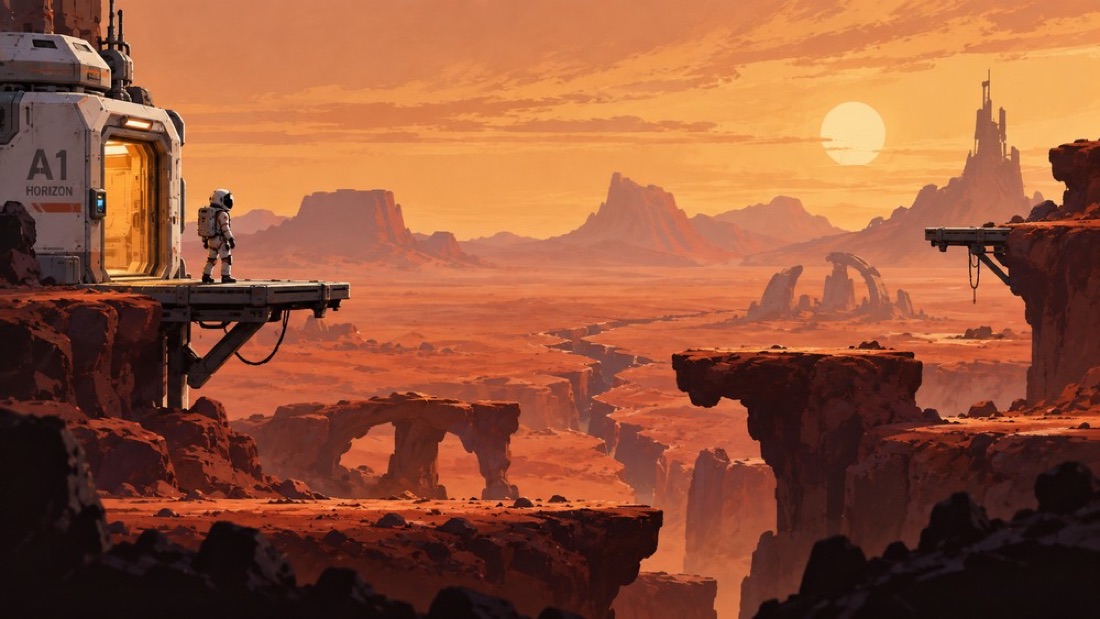
DeepSol concept art: an astronaut on a cliff above an orange Martian canyon, beside a metal airlockThe reference
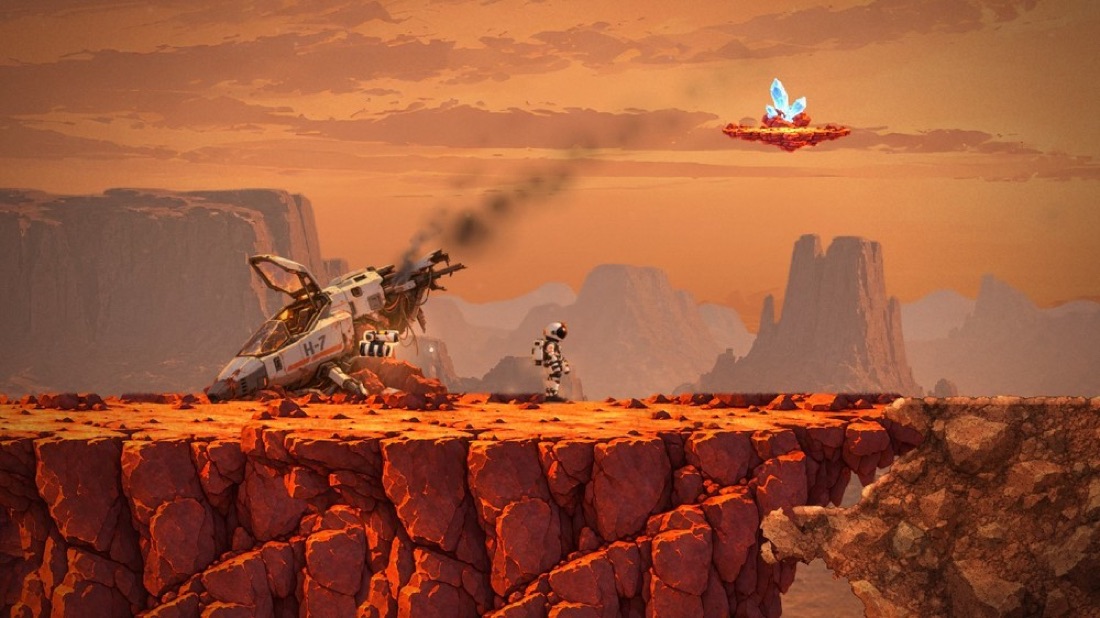
DeepSol in game: the astronaut beside a crashed ship on a painted red rock ledge, matching the concept’s palette and moodIn the game
DeepSol. The concept image (left) is attached as the style reference for every new piece, which is why the game (right) still looks like it. Real captures.

03The workflow, in order

The order matters more than the tool. Most wasted money comes from making lots of art before the look and the hero are settled. On The Exiled King we spent about $31.69 on images before the look was settled, and made about 100 images before the hero could even run.

  1. Pick the look, and keep it simple

    Choose one look from your idea and two or three games you love. Stylised (simplified, not realistic) beats realistic for beginners: flat colour, strong silhouettes (clear outline shapes) and a limited palette (a small set of colours) hide mistakes that realism shows up.

    • Decide early: drawn 2D, 3D models played side-on, or full 3D. We skipped this question once and threw away about 5 hours of 2D work and $7.40 of art.
    • If you can draw, your drawings are the style. Use AI only to clean up and extend them.
  2. Gather references and write five rules

    Collect a game screenshot, a still or your own sketch. From it, write five rules: the colours for each scene, how dark and how bright things get, how bright the hero is against the background, the shapes you use (round for friendly, sharp for danger), and the size of things.

    Describe references by what they look like, never by an artist’s or franchise’s name.
  3. Make one poster, then lock the style

    One poster image shows everyone what the game is aiming for. Then make one style frame: a mock screenshot of one level at your game’s real screen size, with the hero, one enemy, the ground and the health bar or score. Lock five things in a short art bible (a one-page style rule sheet): pixel size or drawing style, palette, light direction, outline, camera angle.

    • Write down the exact tool and version you used. They get retired: Google shut down its original Gemini image model (nicknamed Nano Banana) on 2 October 2026.17
    • After the lock, the style only changes by a deliberate decision, and every existing piece gets rechecked.
  4. Hero first

    Make two to four hero options on a plain flat background, full body, at the game’s view angle. Make them differ in proportion and shape, not just colour. Judge them inside the game, at game size, never on a white page.

    • Side-on and top-down heroes usually fill 8 to 15% of the screen height.
    • No other art until the hero standing still and running look right in motion.
  5. Everything else, by editing

    Every new pose, expression and direction is an edit of the approved hero image, not a brand new image. Ask for a whole animation strip (all the frames side by side) in one image; frames made one at a time drift.

    • Before making world pieces like ground and walls, paste the hero onto one mock frame of the world and check they belong together.
    • Make one or two of a new kind of art and look at them before making a batch.
    • Fewer, better pieces: recolour enemy variants instead of making new ones.
  6. Clean up

    Remove backgrounds, make pixel art sit on a true grid, recolour every image to your palette, and put one colour filter over the whole game so pieces from different tools sit together. Section 07 has the toolkit.

  7. Check it in the game

    Never approve art from a contact sheet (a page of thumbnails). Put it in the game at real size, next to the hero, in the game’s lighting. Only art you’ve approved in the game becomes a reference for future art.

By hand vs with the coach

Doing this by hand means tracking your references, colours and checks on every single image. The Dream Game Coach does it for you: it writes your art bible, attaches your approved references to every new image, and runs the clean-up and slop checks automatically. See Premium

04Prompts that don’t look AI

Write prompts like an art brief, not like a wish. Name the kind of art (ink, paint, pixels), give exact colours, say where the light comes from, and ask for a game asset at your game’s angle rather than a poster. Keep the fixed part of the prompt identical for every piece, and always attach your approved reference images.

Exact colours are written as hex codes, which are just colour codes: six characters, like #FF9A3C for our orange.

Drop these words

epiccinematicultra detailed8kmasterpiecetrendingin the style of [artist]

Say this instead

2-tone cel shadingflat fills1 px dark outline6 hex colours, no otherslight from upper leftsimple shapes, few detailsside view

Cel shading means flat, cartoon-style shading with hard-edged shadows.

Our prompt template

The parts in curly brackets change for each piece. Everything else stays word for word the same.

{subject}, {pose or action}, {view angle} view.
Style: {one-line style}. {shading} shading, {outline} outline, light from {direction}.
Palette limited to: {5 or 6 hex colours}.
Plain flat {background colour} background, full body visible, centered,
no text, no watermark, no extra characters.

Anatomy of a good prompt

Here it is filled in for a cosy night-time game, with each part marked.

  • Subject, pose and view
  • Style and shapes
  • Light
  • Palette
  • Background and framing
A lighthouse keeper holding a lantern, walking, side view.
Style: hand-drawn 2D, ink-dark silhouettes, flat fills with 2-tone shading,
2 px dark outline. Light: warm lantern light from the left, cool teal shadows.
Shapes: rounded and chunky for friends, sharp and thin only for hazards.
Palette limited to: #0f1b2b, #1e3a4c, #2f6f73, #f2c14e, #e5484d, #f4ede1.
Plain flat #FF00FF background, full body visible, centered, no lettering,
no extra characters.
  • #0f1b2b
  • #1e3a4c
  • #2f6f73
  • #f2c14e
  • #e5484d
  • #f4ede1
  • cut out
The six palette colours from the prompt, and the bright pink (#FF00FF) background you remove afterwards. Pink works because it appears nowhere in the art.

Small rules that save hours

  • Don’t ask chat apps for a “transparent background”. Many paint a fake grey checkerboard instead. Ask for a solid flat bright pink (#FF00FF) background and remove it, or use a tool that makes real see-through images.19
  • Say what should be there, not only what shouldn’t: “an empty street” beats “no cars”. Keep “no lettering”, because text is a classic failure.
  • Give the object room. Ask for the whole object inside the frame with an empty margin, no floor, no cast shadow and no glow. Edges touching the frame give you cut-off art, and floors and haze make props look like they float.
  • One facing direction. Flip it in the engine (your game-making software, like Godot) instead of making the mirror image.
  • One wrong frame means redo the whole strip. Patched single frames drift.

05Keeping it consistent

With today’s tools, consistency comes from reference images and edits, not from rewording the prompt. Attach your approved hero and style frame to every new image, and edit from them.

  • References every time. From the moment you approve the hero, every image gets the approved images attached.
  • Edit, don’t regenerate. A new pose is an edit of the approved image.
  • Editing an edit over and over makes it worse. Black Forest Labs, the maker of the FLUX image tool, warns that each round of editing adds small flaws.21 When a character starts drifting, go back to the approved image and edit from there.
  • Lock the palette, twice. Ask for your hex colours in the prompt, then recolour every image to your palette afterwards as a safety net.
  • One colour filter over the whole game. Like a photo filter, one shared colour adjustment over every screen pulls art from different tools together.
  • Write a scale chart. Decide how many pixels make one metre, so every prop is the right size next to the hero. DeepSol’s hero is 96 pixels tall, about 1.8 metres, so the game uses about 53 pixels per metre, and a 1 metre crate is about 53 pixels tall.

Which tool for what

You don’t need all of these. Most beginners start with one chat app and add a second tool only when they hit a wall. Prices change often; these were checked in October 2026.

The easiest startChatGPT

Type what you want, attach your references and save the image. Good for your first concept images and hero options.

CostFree to start

Same character, every timeGoogle Gemini

Good at keeping a character looking the same when you attach reference images of them. Strong for new poses of an approved hero.

CostFree to start

Mood boards and styleMidjourney

Great for exploring a look early. Give it a reference and it copies the colours, materials and lighting.

Cost$10 to $120 a month

True pixel artPixelLab or Retro Diffusion

Built for real pixel art: one pixel size and a small palette. PixelLab can make characters facing 4 or 8 directions, with animations.

CostMonthly plans or pay per image

Only for big projectsTrain your own style

Teach a tool your style with 10 to 30 of your own approved images, then make art in volume. Only worth it with hundreds of pieces to make.

CostPaid plans

For the curious: limits, prices and fine print
  • Gemini takes up to 14 reference images per request, with up to 5 of them characters on the newer versions.17 Every image carries an invisible SynthID watermark (a hidden “made by AI” mark). Through the API (the version code talks to), Nano Banana 2.1 costs about $0.034 for a standard 1K image.18 On the free tier, people at Google may review your prompts.35
  • OpenAI (ChatGPT’s maker): edits accept several reference images, and the API can output real transparent PNGs. The API is priced by tokens (units of usage).19 You own outputs under OpenAI’s terms, though similar images can be made for others (secondary source).
  • Midjourney: version 8.1 became the default in June 2026.20 Style references copy colour, medium and lighting; Omni Reference carries a character into new images. Manual use only, no scripts. Companies earning over $1M a year need the Pro or Mega plan (secondary source).
  • FLUX (Black Forest Labs): FLUX.2 takes up to 10 reference images, and FLUX.1 Kontext is built for consistent edits.22 The downloadable FLUX.2 [dev] weights (the model files) need a paid licence for commercial use. The hosted versions are the simple route.
  • Trained styles: Scenario, or a LoRA (a small style add-on trained on your images). Free tiers are often personal use only.

06Make it readable in play

Pretty isn’t the goal. Readable is. The classic art direction lessons from studios like Valve and Riot are all about what the player sees first.
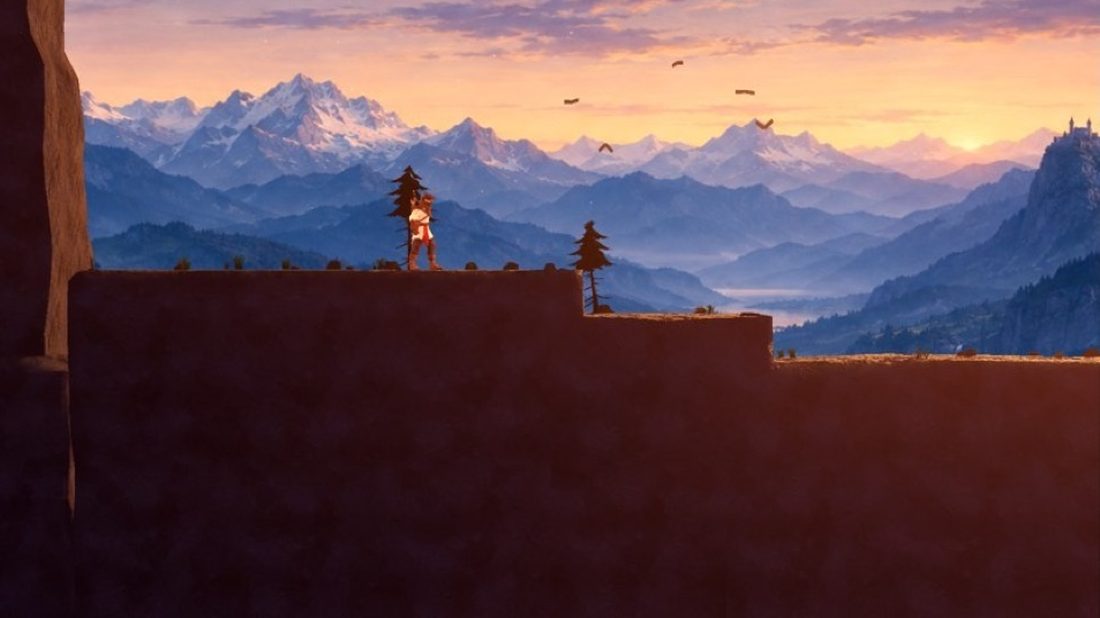
  • Read order. Team Fortress 2 was designed so you read team first (colour), then class (outline shape), then weapon (detail).10
  • Clarity, hierarchy, low noise. Riot’s three goals: gameplay is clearly shown, the most important thing gets the most attention, and visual noise stays low.11
  • The hero is the highest-contrast thing on screen. The layer you play on is the sharpest and brightest. Backgrounds get less contrast and softer colour, and far layers fade toward the sky colour.
  • The grayscale test. Turn the screen grey. If you can still play, your lights and darks work.
  • The silhouette test. Fill the hero solid black at game size. You should still recognise them.
  • One danger colour. Keep one colour for things that hurt, use it nowhere else, and pair it with a shape so colour-blind players can read it too.
  • A limited palette is a choice. The painter James Gurney picks a shape on the colour wheel and paints only with the colours inside it, which gives a deliberate mood.12
  • A clutter budget. Cap layers and effects, and remove something before you add something. On The Exiled King, stacking fog, mist, dust, light shafts and plants made a “beautiful” scene with “a ton of stuff on the screen”.

What the eye sees first

Brightness from back to front A small side-on scene. The far hills are faded and close to the sky colour, the ground you play on is sharper and brighter, and the hero is the brightest thing in the picture. 1 2 3 1 Background Faded, low contrast, near the sky colour 2 Play layer Sharper and brighter than the background 3 Hero The brightest thing on the screen

The silhouette test

The silhouette test A lantern carrier in a wide-brimmed hat with a backpack and a tall pole, shown in colour and then filled solid black. The hat, pole, lantern and backpack still make the black shape easy to recognise. In colour at game size Filled black still easy to recognise
Left: the order the eye should land, from faint background to bright hero. Right: the lantern carrier from section 04’s prompt, in its palette and then filled black. The hat, pole and lantern keep the shape clear. Diagrams, not game captures.
The Exiled King early canyon: flat box-shaped rocks against a mountain backdropBefore
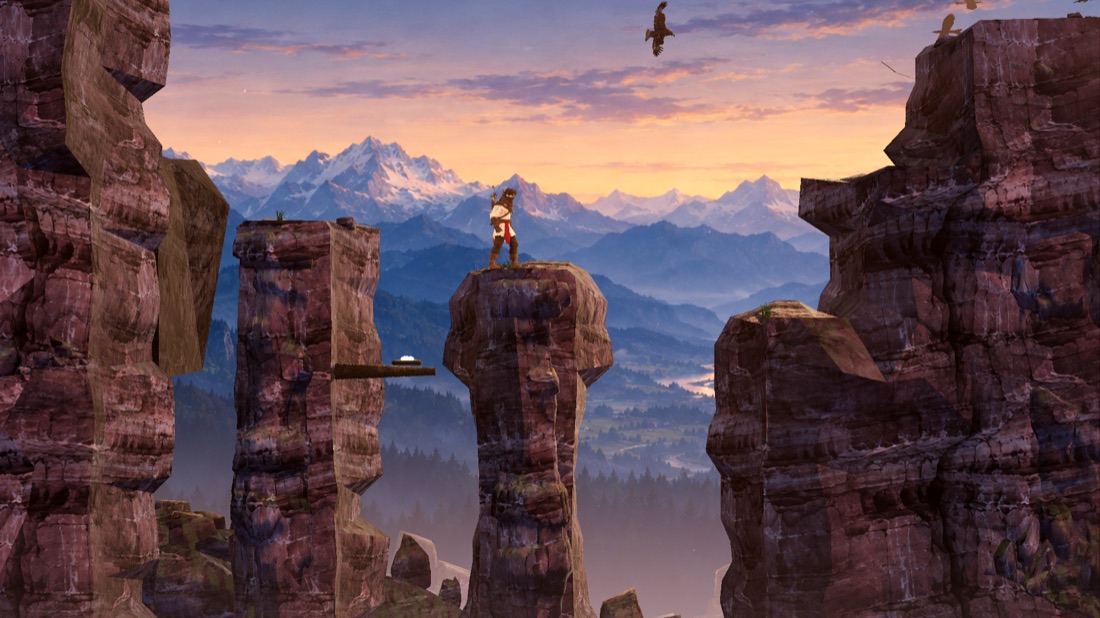
The Exiled King final canyon: the king on a rock pillar with an eagle nest on a branch and an eagle overheadAfter
The Exiled King canyon, first version and final cliffs. The change came from one art direction, real scanned rock and a clear path, not from more prompting. Real captures.

07Clean-up toolkit

Almost every AI image needs finishing. Here is each common problem, the plain fix, and the free tools we use.

Remove the background

Ask for a bright pink background, then cut it out, or let a background-removal tool find the edges for you.

Tools we userembg (free)

Fix the coloured edge around cut-outs

A thin rim of the old background colour often stays behind. Give every edge pixel the colour of the art right next to it.

Tools we useA small script, or your image editor

Make blurry art sharp

Enlarge it with an upscaler (a sharp enlarging tool) made for illustration. Check how big each image really shows on screen: DeepSol found 19 of 112 backgrounds stretched too far, and cut that to 8 of 154.

Tools we useReal-ESRGAN (free, runs on your computer)

Make pixel art sit on a true grid

AI “pixel art” has pixels of mixed sizes. Snap it to one grid and a small palette. Never enlarge pixel art with a smoothing upscaler: scale it by whole numbers (2x, 3x) in the engine.

Tools we usePixel Snapper, Aseprite

Make pieces match

Recolour every image to your palette, then put one colour filter over the whole game. Soften props that look too crisp for a painted world.

Tools we usePalette scripts, the engine’s colour filter

Stop things looking like they float

Find the lowest solid pixel (ignore faint haze), sink it a few pixels into the ground, and check the feet sit on the collision (the game’s solid ground shapes).

Tools we useAn automatic “floating” check

Tidy up 3D models

AI-made 3D models are usually far too detailed underneath, with messy surfaces. Simplify them, fix the surface images, and check their size next to the hero in the game.

Tools we useBlender (free)

For the curious: exact settings
  • Background removal: run rembg with the birefnet-general model (rembg i -m birefnet-general in.png out.png), which is MIT licensed and free for commercial use. Don’t use rembg’s default model: it isn’t licensed for free commercial use.16 For anime-style art, isnet-anime is the other safe choice.
  • Defringe: after the cut-out, replace each edge pixel’s colour with the colour of the nearest fully solid pixel. Fixing the see-through values (the alpha) alone leaves the old background tint on the rim.
  • Upscaling: Real-ESRGAN (BSD-3 licence) has an illustration and anime model, RealESRGAN_x4plus_anime_6B, and ready-made builds for Windows, macOS and Linux.15 Compare each file’s size with its size on screen: art shown much bigger than its file looks soft.
  • Pixel art: find the fake pixel size, snap to that grid, reduce to a small palette, then shrink by taking each block’s main colour.13 Pixel Snapper (MIT) does this for you.14 Aseprite’s indexed colour mode points every pixel at one palette of up to 256 colours, so changing one swatch updates every sprite.31 In the engine, use nearest-neighbour filtering and whole-number scaling.
  • Colour filter in Godot: the Environment’s Adjustments set brightness, contrast and saturation, and can apply colour correction from a gradient or a colour lookup table.30
  • 3D models: reduce the triangle count (the flat pieces a model is made of), for example with Blender’s Decimate modifier, then fix the textures and compare scale in the engine.

08What we learned the hard way

Real numbers from the two games we built with Claude Code.

The Exiled King

Words didn’t get there. One reference did.

Four “different” styles came back as the same realistic painting. Eight versions described in words, over 21 minutes, still missed.

FixOne real reference, five rules written from it: the look landed in 8 minutes for about $0.15.

The Exiled King

Art ran ahead of the game

About 100 images and $20 before the hero could run. One run animation took 15 rounds, about 4 hours and $10, and was never accepted.

FixNo bulk art until the hero standing and running pass. Change method after two rejected rounds.

The Exiled King

Mixed styles on one screen

After switching to 3D, cartoony and realistic pieces sat side by side.

FixOne art direction, painted realism, built on free 3D scans of real rock and plants. About 45 minutes, $0. Image spend in the whole second half: about $0.81.

The Exiled King

It looked worse in the game

The 3D king looked worse in the game than in the tool that made him.

FixMeasuring both side by side found 50,000 triangles (the flat pieces of a 3D model) against 14,630, plus a stray see-through layer. Fixed in about 10 minutes.

DeepSol

Copy and paste was slow and blurry

Making art in ChatGPT and pasting it into the project lost quality and time.

FixA small script that asks the image tool directly from code, with the concept art attached, and records every prompt. 256 images so far.

DeepSol

“Things are floating”

The most repeated complaint, about 15 times. The AI never knows where the ground is.

FixAn automatic check for haze under feet and cut-off edges, run before anything is called done.

DeepSol

Props that looked cartoony

New colony props kept coming out cartoony or brand new.

FixMake them only from 4 approved references plus a short house style, then colour-match to the references.

The Exiled King

Fresh eyes found what we missed

Taking screenshots to a separate AI for an art review, without telling it what we expected, caught grey placeholders and clutter our own checks had missed.

FixA fresh-eyes art review at every look milestone, applied to one spot first, then rolled out.
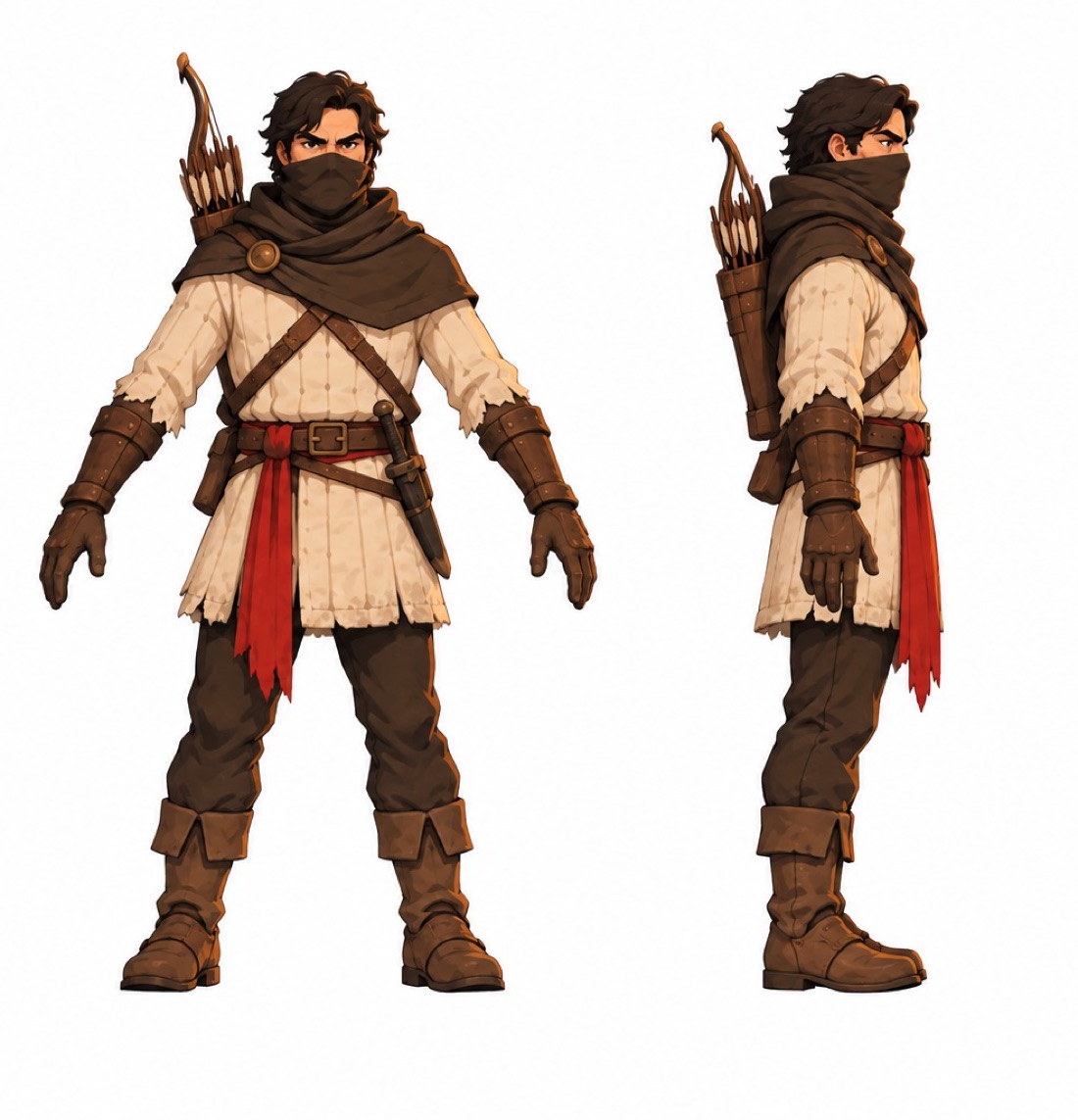
The Exiled King hero concept turnaround, front and side views, with a red sash and a bow on his backOne approved image
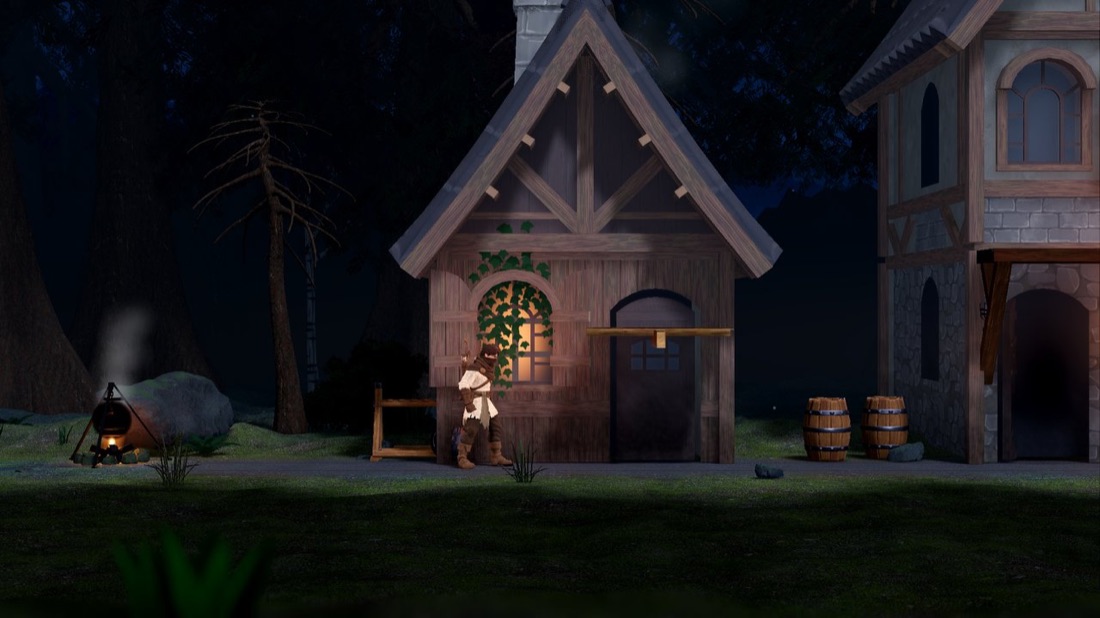
The Exiled King forest village at night: the king beside a timber house built from a free asset packFree pack, one style
Left: the single approved hero image every later version was built from. Right: a village built from a free asset pack (CC0, free for any use), fitted to the same light and palette. Real files from The Exiled King.

09The free path

You can do all of this without paying for an image tool.

  • Concept and hero images: paste your prompt into the free ChatGPT or Gemini app and save the image. Read that app’s terms before you ship anything made there, and disclose it.
  • Free packs: Kenney, KayKit, Quaternius and Poly Haven are CC0, free for any use. A pack always looks consistent, because one artist made all of it. Take the palette from the pack and match your hero to it.
  • Leonardo’s free plan allows commercial use, but free images are public and others can remix them.27
  • Clean-up is free: every tool in section 07 costs nothing.
  • Your own drawing is the strongest way to make AI art look like yours. Sketch it, then let the tool finish it.

10Rules, rights and honesty

This is general information, not legal advice. Store rules and tool terms change: check the official pages before you publish.

Store disclosure

  • Steam asks about AI in its Content Survey, a form you fill in before release. It has two kinds: pre-generated (made during development) and live-generated (made while the game runs). Pre-generated content is reviewed like any other content, and must not copy others’ work or mislead.23 Since January 2026 the form focuses on AI content players actually see, in the game and on the store page, and the disclosure shows on your store page.24
  • itch.io asks creators to disclose generative AI, and is strict about asset pages: untagged assets can be removed from the store.25
  • Game jams (short game-making events) often ban AI art. Read the rules first.

Who owns AI art

The US Copyright Office’s January 2025 report says prompts alone don’t make you the author. Human work you can see in the result, and your creative selection, arrangement and edits, can be protected.26 In practice: work from your own sketches and greyboxes (rough grey-block versions of levels), paint over and arrange the output, and keep your files as a record of the human work.

Tool terms that catch beginners out

  • Read each tool’s terms before you ship. Free plans, paid plans and downloadable versions often have different rules.
  • Midjourney needs its Pro or Mega plan for companies earning over $1M a year.
For the curious: three licence catches
  • FLUX.2 [dev]: the downloadable weights need a paid licence for commercial use.22
  • rembg: the default background-removal model isn’t licensed for free commercial use. Pick birefnet-general instead.16
  • Stability AI models are free for commercial use under $1M a year in revenue.33

Three habits that keep you safe

  1. Never use artist or franchise names. Describe the look in plain art terms. Borrowed famous styles get you mocked and can get you in legal trouble.
  2. Track every placeholder. Keep a list of every AI image and where it’s used, and don’t release while any placeholder is still in.
  3. Be upfront. Disclose what you used. The studios that got hurt worst denied it first.

11The slop check

Run this on any screen of your game before you share it. Your ticks are saved in this browser only.

0 of 0 checks passed

One style

Characters

Clean edges

Readable

In the game

Honest

12Words you’ll see

Collision
the invisible shapes the game treats as solid.
Game jam
an event where people make a game in a few days.
Greybox
a rough version built from plain grey blocks.
Hex code
a colour written as six characters, like #FF9A3C.
Palette
the small set of colours your game uses.
Reference image
a picture you give the AI to match.
Silhouette
the outline shape of a character, filled in black.
Upscaler
a tool that enlarges an image without blurring it.

AI Game Bootcamp Premium

Go from guide to finished game

This guide shows you how to direct AI art. Premium gives you the tools and lessons to do it on every image, start to finish.

  • The Dream Game Sprint video masterclassComing soon
    Step-by-step video lessons from first idea to launch day.
  • The full Dream Game Coach for Claude Code
    It guides your game every day: research, design, levels, art, sound, playtests and launch, with automatic checks.
  • A personal gameplay review from John
    Honest notes on your game from someone who ships them.
Join Premium

13Sources

Outside sources were checked in October 2026. Our own figures come from the development of The Exiled King and DeepSol. Items marked secondary come from reporting rather than the original page.

  1. UC Berkeley School of Information, “A certain ethereal quality: Hany Farid explains why AI art looks the way it does”, Aug 2024. ischool.berkeley.edu
  2. Quantic Foundry gen AI survey (18 Dec 2025), via GamesMarket, 22 Dec 2025. gamesmarket.global
  3. Circana PlayerPulse, via Outlook Respawn, Dec 2025 (secondary). respawn.outlookindia.com
  4. GDC State of the Game Industry 2026. gdconf.com
  5. VGC, Ubisoft on AI art in Anno 117, Nov 2025 (secondary). videogameschronicle.com
  6. Malay Mail, Indie Game Awards and Clair Obscur, 21 Dec 2025 (secondary). malaymail.com
  7. VGC, Postal developer shuts down, Dec 2025 (secondary). videogameschronicle.com
  8. iXBT Games, Vapor World AI cutscenes removed, 22 Aug 2026. ixbt.games
  9. GosuGamers, Jurassic World Evolution 3 removes AI content, Jun 2025. gosugamers.net
  10. Game Developer, “In-depth: how Valve makes art to enhance gameplay”, 29 Jul 2008. gamedeveloper.com
  11. Riot Games, “Clarity in League”, 12 Mar 2021. leagueoflegends.com
  12. Lines and Colors, James Gurney on gamut masking, 19 Sep 2011 (secondary). linesandcolors.com
  13. E. Smirnov, “How to tame your AI pixel art”, DEV Community, 30 Jul 2025. dev.to
  14. Pixel Snapper (MIT). github.com/Hugo-Dz/spritefusion-pixel-snapper
  15. Real-ESRGAN (BSD-3). github.com/xinntao/Real-ESRGAN
  16. rembg, model list and licence notes. github.com/danielgatis/rembg
  17. Google, Gemini API image generation docs. ai.google.dev
  18. Google, Gemini API pricing. ai.google.dev
  19. OpenAI, image generation guide. developers.openai.com
  20. Midjourney, “V8.1 is now the default model”, 11 Jun 2026. updates.midjourney.com
  21. Black Forest Labs, FLUX.1 Kontext, 29 May 2025. bfl.ai
  22. Black Forest Labs, FLUX.2, 25 Nov 2025. bfl.ai
  23. Steamworks documentation, Content Survey. partner.steamgames.com
  24. Gigazine, Steam updates AI disclosure guidelines, 20 Jan 2026 (secondary). gigazine.net
  25. itch.io, creator quality guidelines. itch.io
  26. US Copyright Office, NewsNet 1060, Copyright and AI Part 2, 29 Jan 2025. copyright.gov
  27. Leonardo.ai, commercial usage, 25 Aug 2026. intercom.help/leonardo-ai
  28. Adventure Game Hotspot, Echoes of Somewhere feature. adventuregamehotspot.com
  29. PocketGamer.biz, Belka Games on AI in the art pipeline, 17 Jul 2023. pocketgamer.biz
  30. Godot docs, environment and post-processing. docs.godotengine.org
  31. Aseprite docs, colour mode. aseprite.org
  32. Millet et al., Scientific Reports, Nov 2023. ncbi.nlm.nih.gov
  33. Stability AI Community Licence, 5 Jul 2024. stability.ai
  34. VGC on Steam AI disclosures, 17 Jul 2025. videogameschronicle.com
  35. Google, Gemini API additional terms, 28 Apr 2026. ai.google.dev